
Notifications, AI Agents, and Pending Transaction Categorization
Notifications & The Inbox
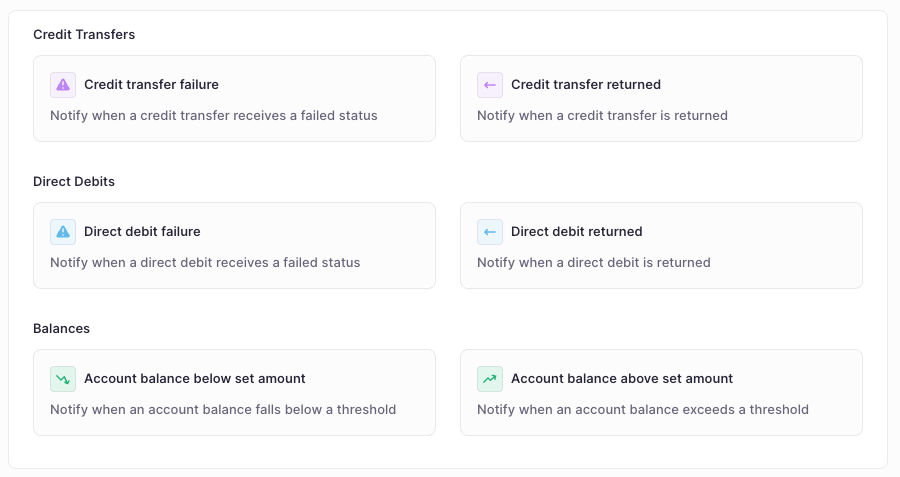
Stay on top of critical events with our new notification engine. You can now automate alerts for specific triggers such as payment approvals, low balances, or failed transactions, ensuring you never miss a beat.
- Targeted vs. Subscribable: Admins can create Targeted rules to ensure specific users (like a Finance Director) always receive an alert, or Subscribable rules that allow the wider team to opt-in to the alerts they find relevant.
- Custom Rule Builder: Build notifications from scratch or use our templates. You can set advanced logic—for example, only trigger an alert if a credit transfer fails AND the amount is over €10,000.
- The Inbox: A centralized workspace to manage alerts. Clicking a notification opens a side-by-side preview, allowing you to take action or review details without losing your place in the dashboard.
- Read / Unread: Easily manage your notification volume by toggling between "All" and "Unread" views. You can also manually mark items as unread to flag them for later follow-up.
- Smart Scoping: Notifications respect your existing permissions. A user will only receive alerts for the entities or accounts they are authorized to see—no noise, no security gaps.
Tip: Use the dynamic "Creator" recipient for subscribable rules so that users are automatically notified about the status of payments they personally initiated.
Read more about setup here: https://docs.atlar.com/docs/notifications-1
AI Agents
Agents act as automated assistants that monitor your financial data and generate proactive insights. You can now deploy specialized agents to handle the "heavy lifting" of data monitoring.
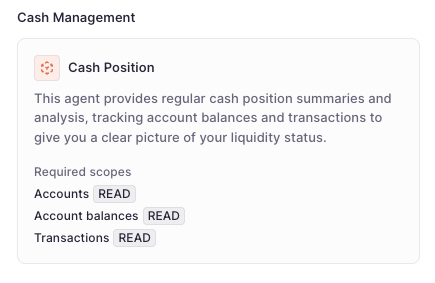
- Cash Position Agent: Our first specialized agent template allows you to automate cash reporting. You can provide Custom Instructions to tailor the tone, focus, and level of detail the agent uses when constructing its report.
- Automated Executions: Set a frequency (e.g., daily or weekly) and the agent will automatically run, analyze your data, and deliver a report directly to your notification Inbox (if you wish).
- History & Governance: Track every run in the Executions tab to see past reports and audit agent activity. Like all Atlar AI features, agents operate strictly within your role-based permissions and no data is used for model training.
Read more about how to set this up here: https://docs.atlar.com/docs/agents
Categorization for Pending Transactions
You can now categorize transactions while they are still in a Pending state. This allows for earlier visibility into your cash flow breakdown before the bank has finalized the booking.
- Early Insights: Assign categories directly within the Pending Transactions tab of the Cash Flow Setup page to keep your reporting up to date in real-time.
- Note: Categorized pending transactions are visible in the transactions list. Support for pending data within the View Builder is not yet available but coming.
Other improvements
- Does not contain operator: Added the "Does not contain" operator to filters, giving you more flexibility when isolating specific datasets.
- Permission Updates: New permission nodes for Notification Rules and Agents are now available in the Access Group settings. Ensure "Notification Rules" READ permissions are enabled to subscribe to alerts.
- Inbox Usability: Added the ability to right-click notifications to "Mark as unread" for easy follow-up later.
- And hundreds of under-the-hood improvements to our connectivity engine and core platform infrastructure to ensure maximum stability and performance for your treasury operations.