
Credit Transfer Batches
Credit transfer batches let you send multiple payments in a single request — ideal for bulk payouts, supplier payments, or other high-volume scenarios.
Process multiple payments at once.
A credit transfer batch is a group of outgoing payments submitted together.
Instead of creating individual payments one by one, you send a single batch containing multiple payment instructions.
Batch processing offers several advantages:
- Efficiency – Ideal for high-volume or recurring payouts
- Consistency – Apply the same metadata across all included payments
- Unified tracking – Monitor the entire batch with a single status
The Credit Transfer Batches tab shows all batches submitted through a CSV upload in the Atlar platform or via your ERP / API.
Batch Status
Each credit transfer batch receives a status indicating its place in the processing flow.
| Status | Definition |
|---|---|
Created | The batch has been created and the information is being validated. |
Completed | The batch was successfully processed and all credit transfers were created. |
Partially failed | Some payments failed to be created; the rest were successful. |
Failed | None of the payments in the batch could be created. |
Tip: If a batch shows Partially failed, open the Errors tab in the detail view to see which rows need correction.
Viewing Batch Details
Double-click a credit transfer batch to open its detailed view, which includes:
- Details – Batch ID, file size, number of payments, total amount, and more
- Errors – Lists issues if the batch failed or partially failed
- Results – Shows the created payments for completed or partially failed batches
- Approval chains – Displays who approved the batch and in what order
Note: The Approval Chains view is empty if batch-level approval is not used.
Payments handled at the individual level (e.g., from an ERP) are approved outside Atlar.
Creating a Credit Transfer Batch
You can create a batch:
- Automatically from your ERP system
- Through the Atlar API
- Manually by uploading a CSV file in the Credit Transfer Batches tab
The steps below explain how to upload a CSV file manually.
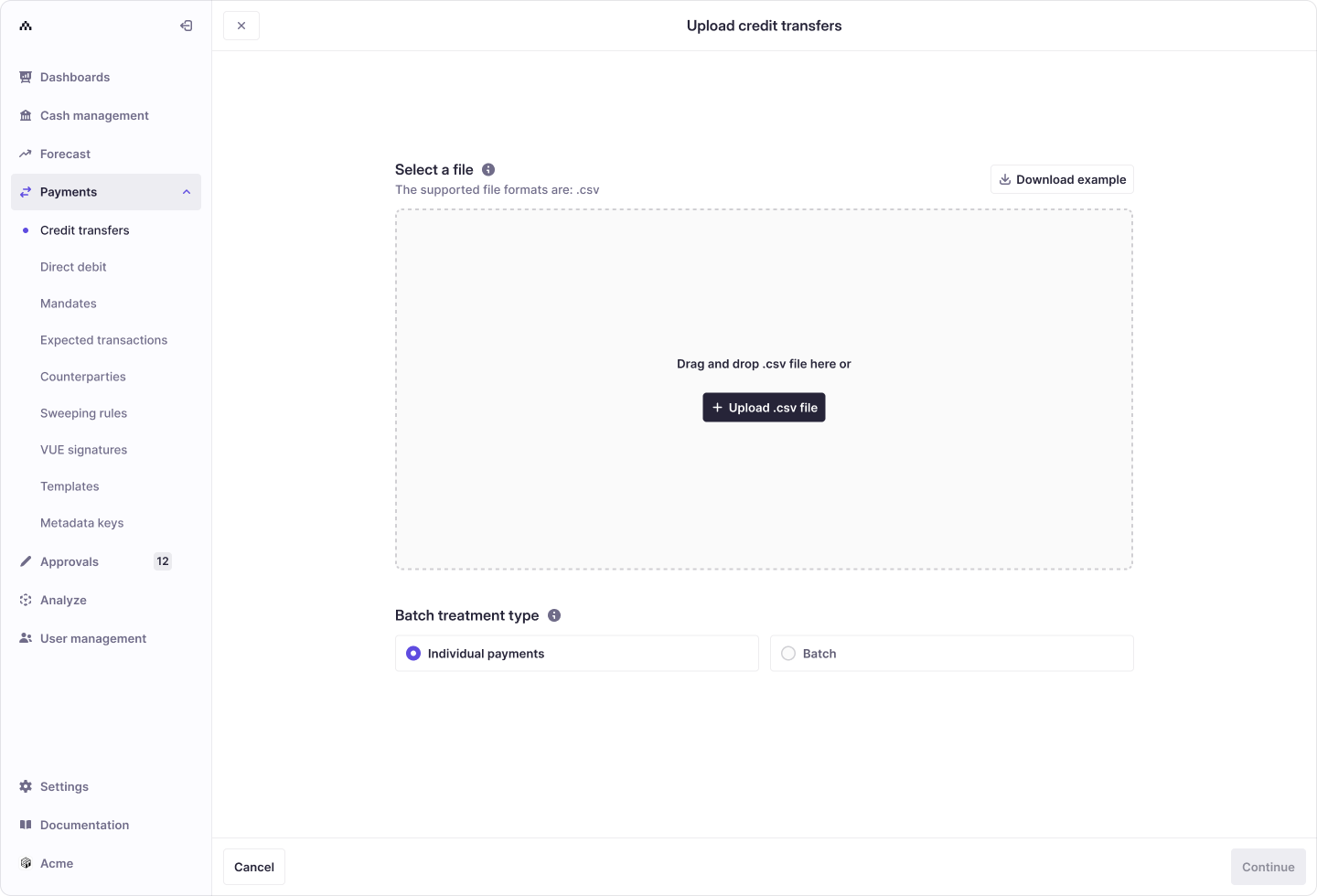
CSV File Format
The CSV file must include a header row.
Some field names are always required, while others are optional or conditionally required.
Warning: If any row requires a field, that field must also appear in the header row—even if other rows don’t use it.
For example, if any row specifies INLINE for destination.type, then fields such as
destination.market, destination.holder.legalName, and
destination.identifier.{type,market,number} must be present in the header.
Supported Fields
| Field | Required | Format |
|---|---|---|
amount.currency | Required | 3-letter ISO currency code (e.g. EUR). |
amount.stringValue | Required | Decimal value with . separator, matching the currency’s decimal format. |
date | Required | yyyy-mm-dd. |
scheme | Required | Payment scheme identifier, e.g. SCT (see payment schemes). |
reference | Required | Free-text remittance reference. |
source.type | Required | Always ACCOUNT. |
source.id | Required | Atlar ID of the source account (Cash Management > Accounts). |
destination.type | Required | ACCOUNT, EXTERNAL_ACCOUNT, or INLINE. |
destination.id | Conditionally required | Required when destination.type is EXTERNAL_ACCOUNT or ACCOUNT. |
destination.externalId | Optional | Only relevant under the previous match-and-create behaviour: external ID assigned if a new account is created. |
destination.market | Conditionally required | Required when destination.type is INLINE. |
destination.holder.legalName | Conditionally required | Required when destination.type is INLINE. |
destination.holder.partyType | Optional | INDIVIDUAL or COMPANY. |
destination.identifier.type | Conditionally required | NUMBER, IBAN, SE_BANKGIRO, SE_PLUSGIRO. |
destination.identifier.market | Conditionally required | 2-letter market/country code. |
destination.identifier.number | Conditionally required | No spaces or formatting symbols. |
destination.bic | Optional | 8 or 11-character SWIFT/BIC code. |
destination.routing.type | Optional | See routing types. |
destination.routing.number | Optional | Bank routing number (no spaces). |
categoryPurpose | Optional | ISO 20022 category purpose code. |
chargeBearer | Optional | SHARED, DEBTOR, or CREDITOR (not supported by all schemes). |
regulatoryReporting.CREDITOR.code | Optional | Required in some markets (e.g. India). |
regulatoryReporting.DEBTOR.code | Optional | Market-specific. |
externalId | Optional | Unique identifier for the payment. |
metadata.<key> | Optional | Custom metadata columns, e.g. metadata.invoiceId. |
Inlining Destination Account
Instead of referencing existing external accounts or counterparties by ID,
you can inline the destination account directly by setting destination.type to INLINE and including the necessary fields.
Tip: When using
INLINE, the payment is sent with exactly the destination details provided in the file. Atlar does not look up or create counterparties or external accounts, and the payment is not linked to a saved counterparty — even if one with matching details already exists.
Note: Until 31 March 2027, some organisations remain on the previous behaviour: Atlar matches an existing counterparty and external account on exact legal name + account details, or creates new ones if no match is found. Contact Atlar if you want to switch to the new behaviour before then.
Inline Data Example
amount.currency,amount.stringValue,date,scheme,reference,source.type,source.id,destination.type,destination.market,destination.holder.legalName,destination.identifier.type,destination.identifier.market,destination.identifier.number,destination.bic
USD,123.45,2024-01-23,CROSS_BORDER,invoice-no.205,ACCOUNT,d89b7f42-62b9-47d2-8969-0743f32ebc0d,INLINE,US,John Smith,NUMBER,US,123456789012,CHASUS33XXX
Inline Behaviour & Examples
When a batch with INLINE content is processed, the destination details from the file are used for that payment only. No counterparty or external account is looked up or created, and the payment is not linked to a saved counterparty.
Under the previous behaviour (available until 31 March 2027 for organisations that have not switched yet), Atlar instead matches an existing counterparty and external account when both destination.holder.legalName and account details (number and routing) are identical, or creates new ones if no match is found.
Mixed Example CSV
The example below demonstrates a mix of functionality:
- Inline destination account information
- Referencing existing destination account resources
- Specifying routing information (e.g. sort code, BIC, ABA)
- Optional fields like
externalIdandmetadata.<key>
amount.currency,amount.stringValue,date,scheme,reference,externalId,source.type,source.id,destination.type,destination.id,destination.market,destination.holder.legalName,destination.identifier.type,destination.identifier.market,destination.identifier.number,destination.bic,destination.routing.type,destination.routing.number,metadata.comment,metadata.my-id
SEK,12.34,2024-02-20,SE_GIRO,invoice-no.119,,ACCOUNT,d73067c3-5427-40b5-b63b-76f89acb5a72,INLINE,,SE,anders andersson,SE_BANKGIRO,SE,12345678,,,,,
DKK,51.35,2024-02-20,DK_A2A,invoice-no.120,,ACCOUNT,57f6dcce-a4f9-4fc7-b496-182c4df0a60c,ACCOUNT,eb2ba9c1-ec7d-43e2-8724-9c85af870308,,,,,,,,,,
EUR,2.00,2024-02-20,SCT,invoice-no.121,,ACCOUNT,d89b7f42-62b9-47d2-8969-0743f32ebc0d,EXTERNAL_ACCOUNT,31380a97-f54b-4ae3-8f7e-3541c2914db6,,,,,,,,,,
GBP,531.42,2024-02-20,GB_CT_FPS,invoice-no.122,,ACCOUNT,5755d02f-0937-492b-adf3-c045cc4e0fa9,INLINE,,GB,John Doe,NUMBER,GB,12345678,,GB_DSC,123456,this is the payment for xyz,21743612948719284
USD,123.45,2024-02-20,CROSS_BORDER,invoice-no.123,,ACCOUNT,5755d02f-0937-492b-adf3-c045cc4e0fa9,INLINE,,US,John Smith,NUMBER,US,123456789012,BOFAUS3NXXX,US_ABA,123456789,"use the metadata fields, to set anything you would like",129572198421
See more example scenarios and required fields in Batch Payments → Example Scenarios.
Metadata Fields
You can include multiple metadata keys by specifying them as separate columns in the format metadata.<your-key>.
...,metadata.comment,metadata.my-id
...,"My comment #1",my-id-123
...,"My comment #2",my-id-456
Example Scenarios with Inlined Destination Account
The tables below illustrate which optional fields must be populated for certain schemes when using inlined destination account information.
These tables focus only on fields marked optional in the fields table; all required fields must still be included.
Cross-border Payment to the UK
When sending a cross-border payment to the UK with an IBAN.
| Field | Value / Notes |
|---|---|
scheme | CROSS_BORDER |
amount.currency | Any |
destination.type | INLINE |
destination.market | GB |
destination.holder.legalName | Required |
destination.identifier.type | IBAN |
destination.identifier.market | GB |
destination.identifier.number | IBAN format (e.g. GBdd...) |
destination.bic | Required |
UK Domestic Faster Payments (FPS)
For domestic GBP payments using the Faster Payments scheme with account number and sort code.
| Field | Value / Notes |
|---|---|
scheme | GB_CT_FPS |
amount.currency | GBP |
destination.type | INLINE |
destination.market | GB |
destination.holder.legalName | Required |
destination.identifier.type | NUMBER |
destination.identifier.market | GB |
destination.identifier.number | 8-digit account number |
destination.routing.type | GB_DSC |
destination.routing.number | 6-digit sort code (e.g. 112233) |
Cross-border Payment to the US
When sending funds to the US using account number and ABA routing.
| Field | Value / Notes |
|---|---|
scheme | CROSS_BORDER |
amount.currency | Any |
destination.type | INLINE |
destination.market | US |
destination.holder.legalName | Required |
destination.identifier.type | NUMBER |
destination.identifier.market | US |
destination.identifier.number | 6–17 digit account number |
destination.bic | Required |
destination.routing.type | US_ABA |
destination.routing.number | 9-digit ABA routing number |
Cross-border Payment to India
For cross-border payments to India, regulatory reporting is required.
| Field | Value / Notes |
|---|---|
scheme | CROSS_BORDER |
amount.currency | Any |
destination.type | INLINE |
destination.market | IN |
destination.holder.legalName | Required |
destination.identifier.type | NUMBER |
destination.identifier.market | IN |
destination.identifier.number | 10–20 digit account number |
destination.bic | Required |
destination.routing.type | IN_FSC |
destination.routing.number | Indian Financial System Code |
regulatoryReporting.CREDITOR.code | Required – see Regulatory Reporting for valid Indian purpose codes. |
SEPA Credit Transfer
For domestic or intra-EU euro payments using IBAN.
| Field | Value / Notes |
|---|---|
scheme | SCT |
amount.currency | EUR |
destination.type | INLINE |
destination.market | e.g. DE (receiver’s country code) |
destination.holder.legalName | Required |
destination.identifier.type | IBAN |
destination.identifier.market | Matches destination.market |
destination.identifier.number | IBAN format (e.g. DEdd...) |
Updated 11 days ago